
Recliner with USB Port: The Ultimate Buying Guide
Stay connected while you relax. Discover how a recliner with a USB port can keep your devices charged, which port types offer the fastest charging, and how to choose the perfect tech-friendly recliner for your home.
View Top PicksWhy a USB Port Matters: In today's connected world, a recliner with a built-in USB port is more than a luxury—it's a practical addition to your living space. Whether you're binge-watching a series, reading on a tablet, or simply relaxing, having a dedicated charging point right at your fingertips eliminates the need to get up or search for an outlet. This guide will walk you through everything you need to know.
What Exactly Is a Recliner with a USB Port?
A recliner with USB port is a modern evolution of the classic recliner chair. It integrates one or more USB charging ports directly into the chair's frame, typically located on the side panel, armrest, or a hidden control panel. These ports are powered by the chair's own power supply (in the case of power recliners) or through a separate AC adapter. This means you can charge your smartphone, tablet, e-reader, or even a smartwatch without needing a wall outlet. It's an ideal feature for anyone who spends a lot of time in their recliner and wants to keep their devices within arm's reach and fully charged. For those who prefer a more traditional look, there are also leather and wood recliners that discreetly incorporate USB ports into their design.
Key Benefits of a USB-Powered Recliner
Convenience at Your Fingertips
No more hunting for a charging cable or crawling behind furniture to find an outlet. Your charging point is right there, integrated into your chair.
Declutter Your Space
Eliminate messy, long cables trailing across your living room floor. A USB recliner keeps your charging setup neat, tidy, and organized.
Stay Entertained Longer
Whether you're using a tablet for movies or a phone for music, you can keep your device charged throughout your entire relaxation session.
Modern & Functional Design
These recliners blend modern technology with comfort. They are a smart choice for tech-savvy individuals and families.
Understanding USB Port Types: Which One Do You Need?
Not all USB ports are created equal. The type of port on your recliner directly affects charging speed and compatibility. Here’s a breakdown of the most common types you’ll find:
USB-A (Standard)
The most common port. It's compatible with almost all standard USB cables. However, charging speeds are typically slower (5W to 12W). Great for overnight charging or powering low-drain devices.
USB-C (Fast Charging)
The modern standard. USB-C ports can deliver significantly more power (up to 100W or more), allowing for rapid charging of smartphones, tablets, and even some laptops. If you have newer devices, a power recliner with cup holder and USB that includes USB-C is a future-proof choice.
USB-A + USB-C Combo
Many premium recliners now offer both port types. This gives you maximum flexibility—use the USB-C for fast charging your phone and the USB-A for a secondary device or accessory.
Wireless Charging Pad
Some high-end models feature a Qi wireless charging pad built into the armrest. This is the ultimate in convenience, allowing you to simply place your compatible phone down to charge. No cables needed at all.
Pros and Cons of a USB Recliner
Pros
- Ultimate convenience for charging devices
- Reduces cable clutter in your room
- Keeps your devices accessible and ready to use
- Modern, tech-forward aesthetic
- Increases the functionality of your furniture
Cons
- Can add to the overall cost of the recliner
- Charging speed may be slower than a dedicated wall charger
- If the port breaks, it can be difficult or costly to repair
- Requires a nearby power outlet for the recliner itself
What to Look For in a Recliner with USB Port
Before you buy, consider these critical factors to ensure you get the best value and functionality. For those with limited space, a small-scale recliner with a USB port is a fantastic option that doesn't compromise on features.
- Port Type & Speed: Look for USB-C with Power Delivery (PD) for the fastest charging. A combo of USB-A and USB-C is ideal.
- Number of Ports: Do you need to charge multiple devices at once? Look for recliners with two or more ports.
- Location of Ports: Are they easily accessible from your seating position? Usually, they are on the outside of the armrest or on a control panel.
- Power Source: Ensure the recliner itself is a power recliner, as these are the models that typically include USB ports. A black power recliner is a stylish and popular choice.
- Build Quality & Warranty: Check the warranty specifically for the electronic components, including the USB ports.
Top-Rated Recliners with USB Ports
⚠️ AFFILIATE DISCLOSURE: This website contains affiliate links. As an affiliate Associate, we earn from qualifying purchases. If you make a purchase through these links, we may receive a small commission at no additional cost to you. Read our full affiliate policy.
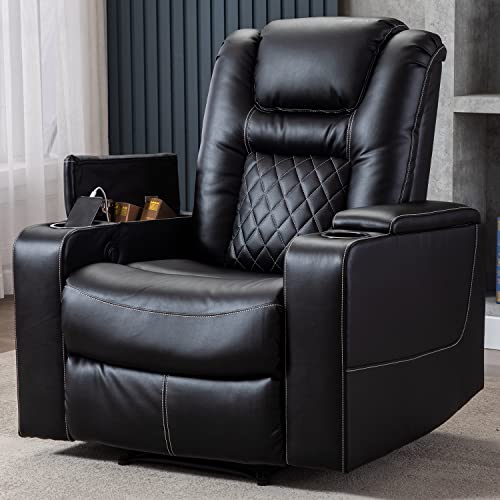
CANMOV Electric Power Recliner Chair with USB Ports and Cup Holders, Breathable Leather Home Theater Seating with Hidden Arm Storage (Black)
Check price on Amazon
LAFWELL Rocking Recliner Chair, Massage Rocker Recliner Chair with Vibration Massage and Heat, USB and Type-C Ports,360° Swivel Faux Leather Chairs, Living Room, Bedroom, Nursery, RV, Black
Check price on Amazon
ANJ Power Recliner Chair with USB Ports and Cup Holders - Overstuffed Electric Home Theater Seating PU Leather Reclining Furniture with Hidden Arm Storage, Easy to Clean (Black)
Check price on Amazon
Amada Power Recliner Chair for Adults, Electric Synchronized Reclining | Power Recliner with USB Ports, Cup Holder & Side Pockets, Thick Seat Cushion, Living Room & Bedroom, Grey Chenille
Check price on Amazon
CANMOV Electric Power Recliner Chair with USB Ports and Cup Holders, Breathable Leather Home Theater Seating with Hidden Arm Storage (Brown)
Check price on Amazon
Rocker Recliner Chair for Living Room with Vibration Massage Heat,Brown | USB Charge Port, 4 Pockets, 2 Cup Holders, Ergonomic Comfy Recliners, Sofa Chair, Reading & Bedroom Chair
Check price on Amazon
Rocker Recliner Chair with Massage and Heat, Comfy Relining Chair with Cup Holders, USB Charge Port, Side Pockets, Nursery Rocking Chairs for Living Room, Ergonomic Single Sofa, Grey
Check price on Amazon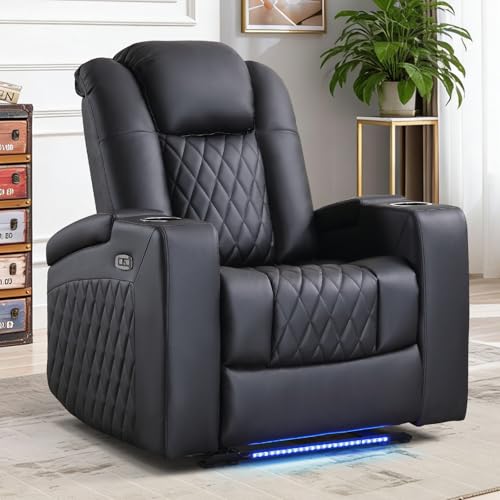
ANJ Home Theater Seating Power Recliner with Hidden Arm Storage, Faux Leather Recliners with LED Light, Electric Movie Reclining Chairs with USB Ports & Cup Holders for Media Living Room, Black
Check price on AmazonFrequently Asked Questions
Can I charge a laptop with a recliner's USB port?
It depends on the port. A standard USB-A port (5V/2.1A) cannot charge a laptop. However, a USB-C port with Power Delivery (PD) and a minimum of 45W output can charge many modern ultrabooks. Always check the power output specifications of the recliner before attempting to charge a laptop.
Do USB ports on recliners work when the recliner is unplugged?
No. The USB ports draw power from the recliner's main power supply. If the recliner is not plugged into a wall outlet, the USB ports will not function. They are not battery-operated.
Are USB ports on recliners repairable?
In many cases, yes. If the port is a separate module, it can sometimes be replaced. However, if it's integrated into the main control board, the repair can be more complex and costly. It's best to check the warranty and look for models with easily replaceable parts. You may also want to consider a recliner power cord with a built-in USB adapter as an alternative.
Is a USB port the same as a power outlet on a recliner?
No. A USB port provides low-voltage DC power for charging small electronics. A power outlet (like a standard AC outlet) provides high-voltage AC power for appliances. Some luxury recliners may include both, but they are different features.
Final Thoughts: Is a Recliner with USB Port Right for You?
A recliner with a USB port is an excellent investment for anyone who values convenience and modern functionality. It transforms your relaxation space into a connected hub, allowing you to stay charged and entertained without sacrificing comfort. When shopping, prioritize USB-C with fast charging, consider the number and location of ports, and ensure the recliner's overall build quality meets your needs. With the right choice, you'll enjoy a seamless blend of comfort and technology for years to come.
For more ways to enhance your comfort, explore our guides on recliners with storage and recliner and footstool sets to create your ultimate relaxation zone.